LOGO OA教程 ERP教程 模切知识交流 PMS教程 CRM教程 开发文档 其他文档  
 
网站管理员

WinForms开发必备!MessageBox消息框的5个实战技巧

admin
2025年11月25日 14:3 本文热度 796

用户误删重要数据,没有任何提醒;程序出错了,用户完全不知道发生了什么;想让用户确认某个操作,却不知道如何优雅地实现...

这些问题的根源都指向同一个核心:缺少有效的用户交互机制。在WinForms开发中,MessageBox作为最基础的交互工具,看似简单却蕴含着巨大的潜力。

今天我将分享5个MessageBox的实战技巧,帮你彻底掌握这个"看起来简单,用起来复杂"的组件,让你的应用程序用户体验瞬间提升一个档次!

🎯 痛点分析:为什么你的MessageBox总是"不给力"?

很多开发者对MessageBox的认知还停留在简单的 MessageBox.Show("Hello World") 层面,导致:

  • • 用户体验差:缺少必要的视觉反馈
  • • 逻辑处理不当:没有正确处理用户的选择结果
  • • 界面不够专业:消息提示千篇一律,缺少针对性

💡 5个实战解决方案

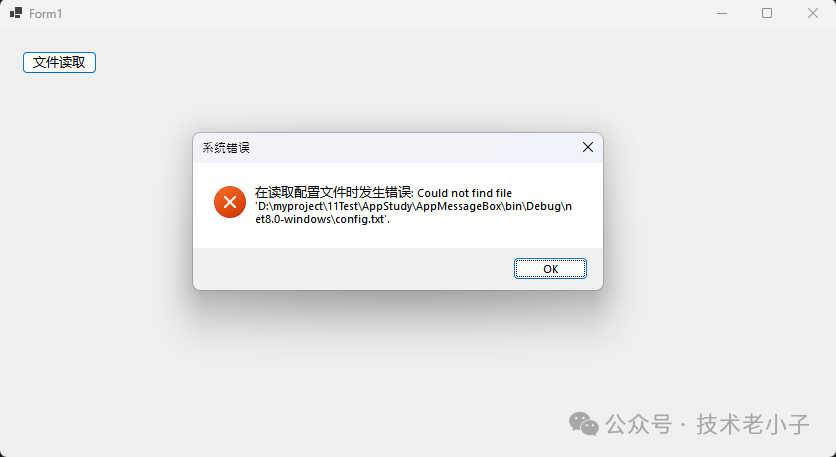
🚀 技巧1:智能化错误提示系统

应用场景:文件操作、数据库连接、网络请求等可能出错的操作

using System;
using System.Collections.Generic;
using System.Linq;
using System.Text;
using System.Threading.Tasks;

namespace AppMessageBox
{
    public static class ErrorHandler
    {
        public static void ShowError(Exception ex, string context = "")
        {
            string errorMessage = string.IsNullOrEmpty(context)
                ? $"发生错误: {ex.Message}"
                : $"在{context}时发生错误: {ex.Message}";

            MessageBox.Show(
                errorMessage,
                "系统错误",
                MessageBoxButtons.OK,
                MessageBoxIcon.Error,
                MessageBoxDefaultButton.Button1
            );
        }
    }
}
using System;
using System.Collections.Generic;
using System.ComponentModel;
using System.Data;
using System.Drawing;
using System.Linq;
using System.Text;
using System.Threading.Tasks;
using System.Windows.Forms;

namespace AppMessageBox
{


    public partial class Form1 : Form
    {
        public Form1()
        {
            InitializeComponent();
        }

        private void btnReadFile_Click(object sender, EventArgs e)
        {
            try
            {
                // 文件读取操作
                string content = File.ReadAllText("config.txt");
            }
            catch (Exception ex)
            {
                ErrorHandler.ShowError(ex, "读取配置文件");
            }
        }
    }
}


⚠️ 常见坑点:不要在错误信息中暴露过多技术细节,用户看不懂反而会增加困扰。

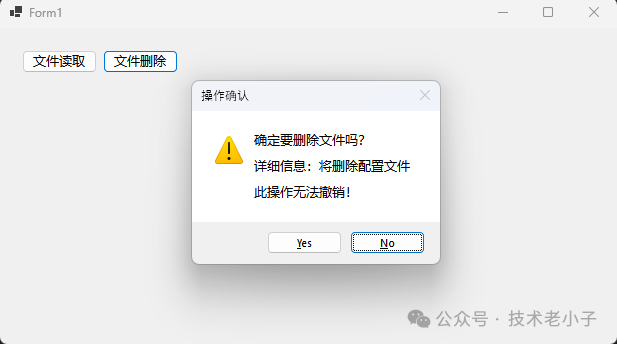
🎨 技巧2:用户操作确认的最佳实践

应用场景:删除数据、退出程序、保存更改等不可逆操作

using System;
using System.Collections.Generic;
using System.Linq;
using System.Text;
using System.Threading.Tasks;

namespace AppMessageBox
{
    public static class ConfirmationHelper
    {
        public static bool ConfirmDangerousAction(string actionName, string details = "")
        {
            string message = string.IsNullOrEmpty(details)
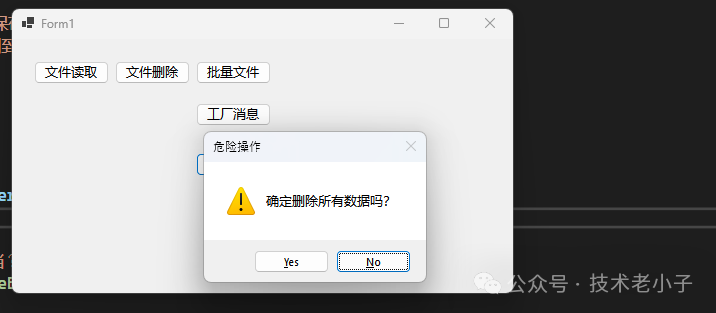
                ? $"确定要{actionName}吗?此操作无法撤销!"
                : $"确定要{actionName}吗?\n\n详细信息:{details}\n\n此操作无法撤销!";

            DialogResult result = MessageBox.Show(
                message,
                "操作确认",
                MessageBoxButtons.YesNo,
                MessageBoxIcon.Warning,
                MessageBoxDefaultButton.Button2  // 默认选中"否",更安全
            );

            return result == DialogResult.Yes;
        }
    }
}


💎 金句总结:默认按钮永远选择最安全的选项,让用户需要主动确认危险操作。

🔄 技巧3:多步骤操作的进度反馈

应用场景:批量处理、长时间操作的中断处理

using System;
using System.Collections.Generic;
using System.Linq;
using System.Text;
using System.Threading.Tasks;

namespace AppMessageBox
{
    public class BatchProcessor
    {
        public void ProcessFiles(string[] filePaths)
        {
            for (int i = 0; i < filePaths.Length; i++)
            {
                try
                {
                    ProcessSingleFile(filePaths[i]);
                }
                catch (Exception ex)
                {
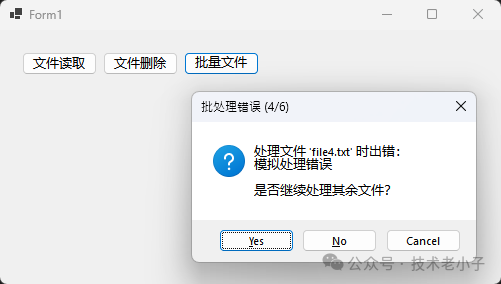
                    DialogResult result = MessageBox.Show(
                        $"处理文件 '{Path.GetFileName(filePaths[i])}' 时出错:\n{ex.Message}\n\n是否继续处理其余文件?",
                        $"批处理错误 ({i + 1}/{filePaths.Length})",
                        MessageBoxButtons.YesNoCancel,
                        MessageBoxIcon.Question,
                        MessageBoxDefaultButton.Button1
                    );

                    if (result == DialogResult.No)
                        break;  // 停止处理
                    elseif (result == DialogResult.Cancel)
                        return// 取消整个操作
                                // Yes:继续处理下一个文件
                }
            }

            MessageBox.Show("批处理完成!""操作完成", MessageBoxButtons.OK, MessageBoxIcon.Information);
        }

        private void ProcessSingleFile(string filePath)
        {
            // 模拟文件处理逻辑
            if (new Random().Next(03) == 0// 随机抛出异常以模拟错误
            {
                thrownew Exception("模拟处理错误");
            }
        }
    }
}

📊 技巧4:自定义消息框工厂模式

应用场景:统一应用程序的交互风格,便于维护和修改

using System;
using System.Collections.Generic;
using System.Linq;
using System.Text;
using System.Threading.Tasks;

namespace AppMessageBox
{
    public static classMessageBoxFactory
    {
        private conststring APP_NAME = "我的应用程序";

        public static void ShowSuccess(string message)
        {
            MessageBox.Show(message, $"{APP_NAME} - 成功",
                MessageBoxButtons.OK, MessageBoxIcon.Information);
        }

        public static void ShowWarning(string message)
        {
            MessageBox.Show(message, $"{APP_NAME} - 警告",
                MessageBoxButtons.OK, MessageBoxIcon.Warning);
        }

        public static bool AskYesNo(string question)
        {
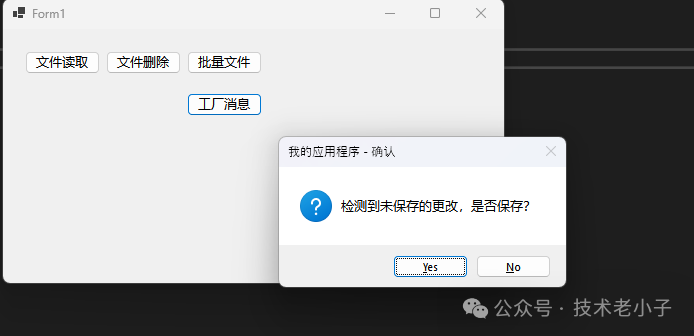
            return MessageBox.Show(question, $"{APP_NAME} - 确认",
                MessageBoxButtons.YesNo, MessageBoxIcon.Question) == DialogResult.Yes;
        }

        public static DialogResult AskYesNoCancel(string question)
        {
            return MessageBox.Show(question, $"{APP_NAME} - 选择",
                MessageBoxButtons.YesNoCancel, MessageBoxIcon.Question,
                MessageBoxDefaultButton.Button3); // 默认选择"取消"
        }
    }
}


💎 金句总结:工厂模式让MessageBox使用更规范,一次定义,处处受益。

🎯 技巧5:智能默认按钮选择策略

应用场景:提升用户操作效率,减少误操作

using System;
using System.Collections.Generic;
using System.Linq;
using System.Text;
using System.Threading.Tasks;

namespace AppMessageBox
{
    public enum ActionSafety
    {
        Safe,       // 安全操作,默认选择执行
        Neutral,    // 中性操作,默认选择第一个
        Dangerous   // 危险操作,默认选择取消
    }

    public static class SmartMessageBox
    {
        public static DialogResult Show(string message, string title,
            MessageBoxButtons buttons, MessageBoxIcon icon, ActionSafety safety
)

        {
            MessageBoxDefaultButton defaultButton;

            switch (safety)
            {
                case ActionSafety.Safe:
                    defaultButton = MessageBoxDefaultButton.Button1; // 默认执行
                    break;
                case ActionSafety.Dangerous:
                    defaultButton = buttons == MessageBoxButtons.YesNo
                        ? MessageBoxDefaultButton.Button2  // 默认选择"否"
                        : MessageBoxDefaultButton.Button2; // 默认选择"取消"
                    break;
                default:
                    defaultButton = MessageBoxDefaultButton.Button1;
                    break;
            }

            return MessageBox.Show(message, title, buttons, icon, defaultButton);
        }
    }
}


🔥 收藏级代码模板

using System;
using System.Collections.Generic;
using System.Linq;
using System.Text;
using System.Threading.Tasks;

namespace AppMessageBox
{
    public static class EnhancedMessageBox
    {
        public static bool ConfirmDelete(string itemName)
        {
            return MessageBox.Show(
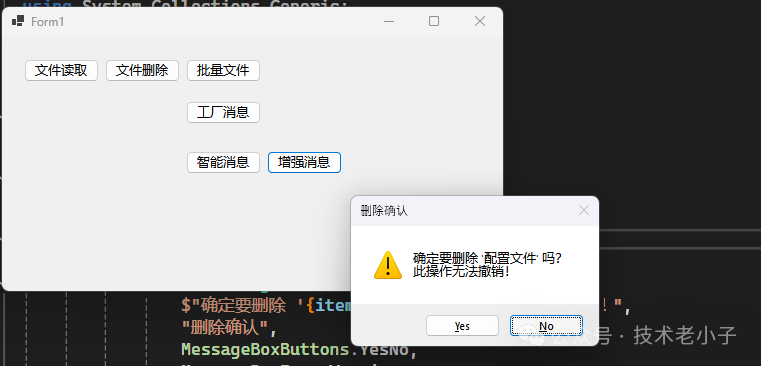
                $"确定要删除 '{itemName}' 吗?\n此操作无法撤销!",
                "删除确认",
                MessageBoxButtons.YesNo,
                MessageBoxIcon.Warning,
                MessageBoxDefaultButton.Button2
            ) == DialogResult.Yes;
        }

        public static void ShowOperationResult(bool success, string operation)
        {
            if (success)
            {
                MessageBox.Show($"{operation}成功完成!""操作成功",
                    MessageBoxButtons.OK, MessageBoxIcon.Information);
            }
            else
            {
                MessageBox.Show($"{operation}失败,请重试。""操作失败",
                    MessageBoxButtons.OK, MessageBoxIcon.Error);
            }
        }
    }
}


⚡ 核心要点总结

通过今天的分享,我们掌握了MessageBox的5个核心应用技巧:

  1. 1. 智能化错误处理:让错误提示更友好、更有针对性
  2. 2. 安全的操作确认:通过默认按钮选择减少误操作风险
  3. 3. 进度反馈机制:在长时间操作中保持良好的用户体验

💎 收藏级总结:优秀的MessageBox设计原则是"安全第一,体验至上,风格统一"。

记住,MessageBox虽小,却是用户体验的重要组成部分。每一个精心设计的交互细节,都会让你的应用程序更加专业和贴心。


阅读原文:原文链接


该文章在 2025/11/25 18:44:23 编辑过
关键字查询
相关文章
正在查询...
点晴ERP是一款针对中小制造业的专业生产管理软件系统,系统成熟度和易用性得到了国内大量中小企业的青睐。
点晴PMS码头管理系统主要针对港口码头集装箱与散货日常运作、调度、堆场、车队、财务费用、相关报表等业务管理,结合码头的业务特点,围绕调度、堆场作业而开发的。集技术的先进性、管理的有效性于一体,是物流码头及其他港口类企业的高效ERP管理信息系统。
点晴WMS仓储管理系统提供了货物产品管理,销售管理,采购管理,仓储管理,仓库管理,保质期管理,货位管理,库位管理,生产管理,WMS管理系统,标签打印,条形码,二维码管理,批号管理软件。
点晴免费OA是一款软件和通用服务都免费,不限功能、不限时间、不限用户的免费OA协同办公管理系统。
Copyright 2010-2025 ClickSun All Rights Reserved