LOGO OA教程 ERP教程 模切知识交流 PMS教程 CRM教程 开发文档 其他文档  
 
网站管理员

前端自制接口抓取工具:一键收集并导出接口列表

zhenglin
2025年12月2日 17:18 本文热度 328

在日常开发或者做接口文档的时候,我们经常会遇到这样一个场景:

👉 想要快速知道某个页面到底调用了哪些接口。


手动去 Network 面板 一个个筛选、复制,既繁琐又容易遗漏。于是,我写了一个小工具,可以在页面中自动劫持 fetch、XHR、axios 的请求,实时收集接口,并一键导出到 Excel 文件。

下面分享一下完整实现和思路。


功能目标

  1. 一键开启接口收集:点击按钮后,所有页面请求都会被记录下来。

  2. 过滤非接口请求:过滤掉 js/css/png/jpg 等静态资源。

  3. 接口去重、排序:相同接口只保留一条,按请求方法和路径排序。

  4. 导出 Excel 文件:收集结果一键导出,便于做接口文档或测试。

  5. 清空记录:可以重新开始收集。


实现思路

核心思路其实很简单:

  • 通过劫持 fetchXMLHttpRequest.openaxios.request,在发出请求时把接口地址和方法存下来。

  • 提供一个小浮窗按钮,便于操作。

  • 用 xlsx.js 生成 Excel 文件并下载。


核心代码

1. 注入 XLSX 库

用于导出 Excel 文件:


const xlsxScript = document.createElement("script");

xlsxScript.src = "https://cdn.bootcdn.net/ajax/libs/xlsx/0.18.5/xlsx.full.min.js";

xlsxScript.onload = () => console.log("✅ XLSX 已加载");

document.head.appendChild(xlsxScript);


2. 按钮 UI

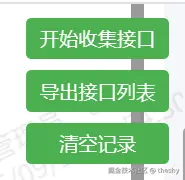
简单的三个按钮:开始收集、导出接口、清空记录。


function makeBtn(text, onclick) {

  const btn = document.createElement("button");

  btn.textContent = text;

  btn.style.cssText = `

    padding:6px 10px;background:#4CAF50;color:white;

    border:none;border-radius:4px;cursor:pointer;font-size:14px

  `;

  btn.onclick = onclick;

  return btn;

}


const container = document.createElement("div");

container.style = `

  position:fixed;top:10px;right:10px;z-index:999999;

  display:flex;flex-direction:column;gap:8px;

`;

container.appendChild(makeBtn("开始收集接口", () => { collecting = true; alert("✅ 开始收集接口,请点击页面操作产生请求"); }));

container.appendChild(makeBtn("导出接口列表", exportExcel));

container.appendChild(makeBtn("清空记录", () => { requests.length = 0; alert("✅ 已清空记录"); }));

document.body.appendChild(container);

3. 劫持请求

这里支持 fetchXHR 和 axios,保证覆盖大部分场景。


// 劫持 fetch

const originalFetch = window.fetch;

window.fetch = async (...args) => {

  if (collecting) {

    const [url, options] = args;

    const method = (options && options.method) || "GET";

    if (isApiRequest(url)) requests.push({ url, method });

  }

  return originalFetch.apply(this, args);

};


// 劫持 XHR

const originalOpen = XMLHttpRequest.prototype.open;

XMLHttpRequest.prototype.open = function(method, url, ...rest) {

  if (collecting && isApiRequest(url)) {

    requests.push({ url, method });

  }

  return originalOpen.call(this, method, url, ...rest);

};


// 劫持 axios

if (window.axios) {

  const originalRequest = window.axios.request;

  window.axios.request = function(config) {

    if (collecting && isApiRequest(config.url)) {

      requests.push({ url: config.url, method: (config.method || "GET").toUpperCase() });

    }

    return originalRequest.call(this, config);

  };

}


4. 导出 Excel

利用 xlsx.js,将收集到的接口列表转成表格并下载。


function exportExcel() {

  if (!window.XLSX) return alert("❌ XLSX 库未加载,请稍等");


  const unique = new Set();

  requests.filter(r => isApiRequest(r.url)).forEach(({ url, method }) => {

    unique.add(normalize(url) + " | " + method.toUpperCase());

  });


  const rows = [["接口地址", "请求方式"]];

  Array.from(unique).sort().forEach(entry => {

    const [url, method] = entry.split(" | ");

    rows.push([url, method]);

  });


  const worksheet = XLSX.utils.aoa_to_sheet(rows);

  worksheet["!cols"] = [{ wch: 60 }, { wch: 10 }];


  const workbook = XLSX.utils.book_new();

  XLSX.utils.book_append_sheet(workbook, worksheet, "接口列表");


  const timestamp = new Date().toISOString().replace(/[:T]/g, "-").split(".")[0];

  XLSX.writeFile(workbook, `接口列表_${timestamp}.xlsx`);


  alert("✅ 已导出接口列表");

}

使用效果

  1. ​把这段代码粘贴到控制台执行(或写成书签脚本)。

  2. ​页面右上角会出现三个按钮。

  3. 点击 “开始收集接口” ,然后正常操作页面,产生接口请求。

  4. 点击 “导出接口列表” ,自动下载 Excel 文件,包含接口地址和请求方式。


总结

这个小工具的优点:

  • 不依赖后端,纯前端搞定。

  • 不用再一个个去 Network 面板 抄接口。

  • 导出的 Excel 可以直接用作 接口文档初稿测试用例依据


缺点:

  • 只能抓取页面 运行时产生的请求,没触发的接口不会被记录。

  • 部分接口如果通过 WebSocket 或其他协议传输,不会被收集。


但对于大部分前端页面的接口抓取需求,足够好用了。 🚀

完整代码复制到控制台即用


(function() {

  // -------------------- 加载 XLSX 库 --------------------

  const xlsxScript = document.createElement("script");

  xlsxScript.src = "https://cdn.bootcdn.net/ajax/libs/xlsx/0.18.5/xlsx.full.min.js";

  xlsxScript.onload = () => console.log("✅ XLSX 已加载");

  document.head.appendChild(xlsxScript);


  // -------------------- 创建按钮 --------------------

  const container = document.createElement("div");

  container.style.position = "fixed";

  container.style.top = "10px";

  container.style.right = "10px";

  container.style.zIndex = 999999;

  container.style.display = "flex";

  container.style.flexDirection = "column";

  container.style.gap = "8px";


  let collecting = false;

  const requests = [];


  function makeBtn(text, onclick) {

    const btn = document.createElement("button");

    btn.textContent = text;

    btn.style.padding = "6px 10px";

    btn.style.background = "#4CAF50";

    btn.style.color = "white";

    btn.style.border = "none";

    btn.style.borderRadius = "4px";

    btn.style.cursor = "pointer";

    btn.style.fontSize = "14px";

    btn.onclick = onclick;

    return btn;

  }


  container.appendChild(makeBtn("开始收集接口", () => {

    collecting = true;

    alert("✅ 开始收集接口,请点击页面操作产生请求");

  }));


  container.appendChild(makeBtn("导出接口列表", exportExcel));

  container.appendChild(makeBtn("清空记录", () => {

    requests.length = 0;

    alert("✅ 已清空记录");

  }));


  document.body.appendChild(container);


  // -------------------- 工具函数 --------------------

  function normalize(url) {

    try {

      const u = new URL(url, location.origin);

      const path = u.pathname;

      const idx = path.indexOf("api/");

      return idx >= 0 ? path.slice(idx + 4) : path;

    } catch {

      const path = url.split("?")[0];

      const idx = path.indexOf("api/");

      return idx >= 0 ? path.slice(idx + 4) : path;

    }

  }


  function isApiRequest(url) {

    // 过滤掉静态资源

    return !url.match(/\.(js|json|css|png|jpg|jpeg|gif|svg|ico|woff|woff2|ttf|map)(\?|$)/i);

  }


  function exportExcel() {

    if (!window.XLSX) {

      alert("❌ XLSX 库未加载,请稍等");

      return;

    }

    const filtered = requests.filter(r => isApiRequest(r.url));

    if (filtered.length === 0) {

      alert("⚠️ 没有接口记录,请先点击页面操作产生接口");

      return;

    }


    const unique = new Set();

    filtered.forEach(({ url, method }) => {

      const key = normalize(url) + " | " + method.toUpperCase();

      unique.add(key);

    });


    // 排序:先按 method,再按 url

    const methodOrder = { GET: 1, POST: 2, PUT: 3, DELETE: 4 };

    const sorted = Array.from(unique).sort((a, b) => {

      const [urlA, methodA] = a.split(" | ");

      const [urlB, methodB] = b.split(" | ");

      const orderA = methodOrder[methodA] || 99;

      const orderB = methodOrder[methodB] || 99;

      if (orderA === orderB) return urlA.localeCompare(urlB);

      return orderA - orderB;

    });


    const rows = [["接口地址", "请求方式"]];

    sorted.forEach(entry => {

      const [url, method] = entry.split(" | ");

      rows.push([url, method]);

    });


    const worksheet = XLSX.utils.aoa_to_sheet(rows);


    // 设置列宽

    worksheet["!cols"] = [{ wch: 60 }, { wch: 10 }];


    const workbook = XLSX.utils.book_new();

    XLSX.utils.book_append_sheet(workbook, worksheet, "接口列表");


    // 文件名带时间戳

    const timestamp = new Date().toISOString().replace(/[:T]/g, "-").split(".")[0];

    XLSX.writeFile(workbook, `接口列表_${timestamp}.xlsx`);


    alert("✅ 已导出接口列表");

  }


  // -------------------- 劫持 fetch --------------------

  const originalFetch = window.fetch;

  window.fetch = async (...args) => {

    if (collecting) {

      try {

        const [url, options] = args;

        const method = (options && options.method) || "GET";

        if (isApiRequest(url)) requests.push({ url, method });

      } catch (e) {}

    }

    return originalFetch.apply(this, args);

  };


  // -------------------- 劫持 XHR --------------------

  const originalOpen = XMLHttpRequest.prototype.open;

  XMLHttpRequest.prototype.open = function(method, url, ...rest) {

    if (collecting) {

      try {

        if (isApiRequest(url)) requests.push({ url, method });

      } catch (e) {}

    }

    return originalOpen.call(this, method, url, ...rest);

  };


  // -------------------- 劫持 axios --------------------

  if (window.axios) {

    const originalRequest = window.axios.request;

    window.axios.request = function(config) {

      if (collecting) {

        try {

          if (isApiRequest(config.url))

            requests.push({ url: config.url, method: (config.method || "GET").toUpperCase() });

        } catch (e) {}

      }

      return originalRequest.call(this, config);

    };

  }


  console.log("✅ 接口收集工具已注入页面上下文,XLSX 库正在加载");

})();

参考文章:原文链接


该文章在 2025/12/2 17:18:26 编辑过
关键字查询
相关文章
正在查询...
点晴ERP是一款针对中小制造业的专业生产管理软件系统,系统成熟度和易用性得到了国内大量中小企业的青睐。
点晴PMS码头管理系统主要针对港口码头集装箱与散货日常运作、调度、堆场、车队、财务费用、相关报表等业务管理,结合码头的业务特点,围绕调度、堆场作业而开发的。集技术的先进性、管理的有效性于一体,是物流码头及其他港口类企业的高效ERP管理信息系统。
点晴WMS仓储管理系统提供了货物产品管理,销售管理,采购管理,仓储管理,仓库管理,保质期管理,货位管理,库位管理,生产管理,WMS管理系统,标签打印,条形码,二维码管理,批号管理软件。
点晴免费OA是一款软件和通用服务都免费,不限功能、不限时间、不限用户的免费OA协同办公管理系统。
Copyright 2010-2025 ClickSun All Rights Reserved