1.认识 Nginx
Nginx 是一个免费开源的、高性能的 Web 和反向代理服务器。
比如我们去请求 www.zhifou.com,Nginx 监听到我们的请求之后,会将对应的服务器资源返回给我们。
Nginx 就像一个菜鸟驿站:
- 1.你去菜鸟驿站拿快递(访问网址,请求服务器资源)
- 2.菜鸟驿站员工根据取件码去货架拿快递给你(Nginx根据浏览器路径去请求服务器不同的资源)
当然了 Nginx 不止于“分发快递”这么简单,它还有很多牛逼的功能。我会在后面一一介绍给大家。
2. Linux 安装 Nginx
注:本篇文章的开发环境都是基于 Linux 系统。
# 安装 Nginx
sudo yum install nginx
# 启动 Nginx
sudo systemctl start nginx
# 设置开机自启
sudo systemctl enable nginx
# 检查 Nginx 状态
sudo systemctl status nginx

Nginx 默认静态资源文件夹位置:
/usr/share/nginx/html

Nginx 配置文件 nginx.conf 的位置:
/etc/nginx

nginx.conf:
user nginx;
#Nginx进程,一般设置为和CPU核数一样
worker_processes auto;
#存放错误日志的目录
error_log /var/log/nginx/error.log;
#进程pid存放位置
pid /run/nginx.pid;
include /usr/share/nginx/modules/*.conf;
events {
# 单个后台进程的最大并发数
    worker_connections 1024;
}
http {
#设置日志模式
    log_format  main  '$remote_addr - $remote_user [$time_local] "$request" '
                      '$status $body_bytes_sent "$http_referer" '
                      '"$http_user_agent" "$http_x_forwarded_for"';
#nginx访问日志存放位置
    access_log  /var/log/nginx/access.log  main;

    sendfile            on; #开启高效传输模式
    tcp_nopush          on; #减少网络报文段的数量
    tcp_nodelay         on;
    keepalive_timeout   65; #超时时间
    types_hash_max_size 2048;
#gzip  on;  #开启gzip压缩
#包含的子配置项位置和文件
    include             /etc/nginx/mime.types;
    default_type        application/octet-stream;

    include /etc/nginx/conf.d/*.conf;

    server {
        listen       80;
        server_name localhost;
        root         /usr/share/nginx/html;
        include /etc/nginx/default.d/*.conf;

  location / {
   root   /usr/share/nginx/html;     #服务默认启动目录
   index  index.html index.htm;    #默认访问文件
  }
#错误状态码的显示页面
        error_page 404 /404.html;
            location = /40x.html {
        }

        error_page 500 502 503 504 /50x.html;
            location = /50x.html {
        }
    }
}
3. Server 配置详解
3.1 server 配置
Nginx 的核心配置是 server,它主要用来监听端口,处理请求等。
server {
   listen       80;
   server_name localhost;
   root         /usr/share/nginx/html;
   include /etc/nginx/default.d/*.conf;
   location / {
   }
}
比如我们发起请求:
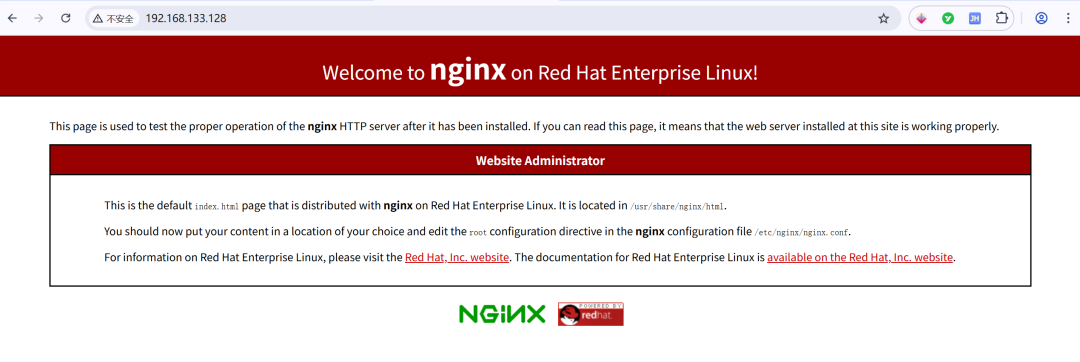
Nginx 监听到我们访问了这台服务器的 80 端口,默认会将 /usr/share/nginx/html 下面的 index.html 的内容返回给浏览器。
所以如果你把公司官网的 index.html 替换原有的 index.html,那请求这个ip,访问的就是你公司官网的内容。
我们随便搞一个 index.html,然后替换一下。
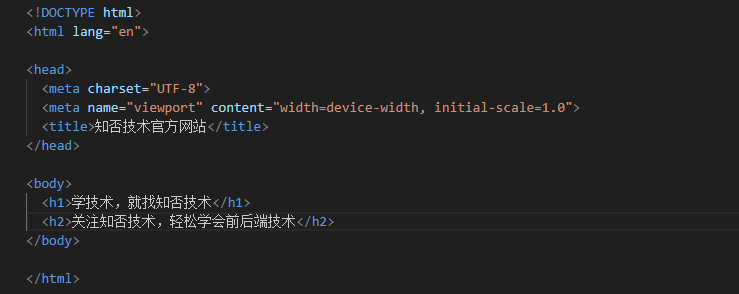
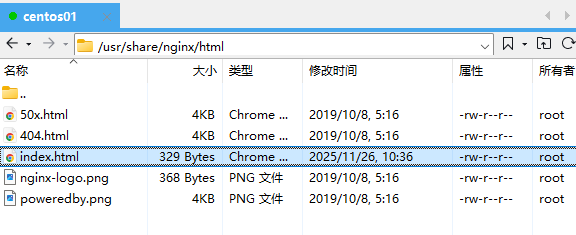
再次访问:
那这时候你又有疑问了,那如果我想更改 index.html 的访问目录呢,比如把 index.html 放到 /usr/local/assets里面。
方案 1:更改 Server 里面的 root
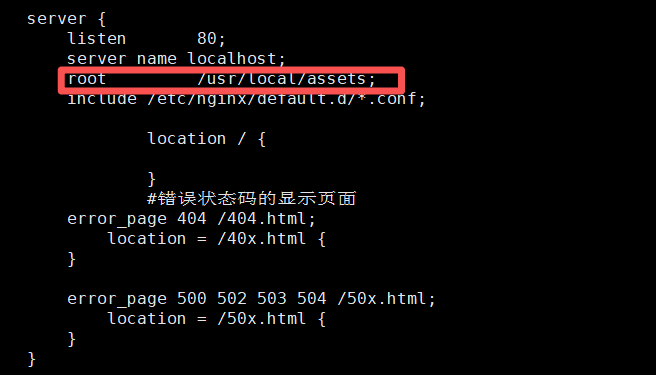
方案 2: 设置 location
server {
 listen       80;
 server_name localhost;
 root         /usr/local/zhifou;
 include /etc/nginx/default.d/*.conf;

 location / {
    root   /usr/local/assets;
    index  index.html index.htm;    #默认访问文件
     }
   }
}
注:
- 1. 更改完 nginx.conf 之后记得执行 systemctl reload nginx 命令重启 nginx
- 2. 如果设置了 Location,那 nginx 会优先按照 location 的配置来。没有设置 location 就按照 server 的 root 配置来。
3.2 配置多个 server
server {
  listen       80;
  server_name localhost;
  location / {
   root   /usr/local/assets;
   index  index.html index.htm;    #默认访问文件
  }
    }
 }

server {
  listen       8080;
  server_name localhost;
  location / {
   root   /usr/local/assets/blog;
   index  index.html index.htm;    #默认访问文件
  }
 }
}
3.3 server_name 详解
- server_name:域名地址,也就是我们请求的网址
server_name 默认是 localhost,指向本地。当然我们也可以设置不同的域名地址。
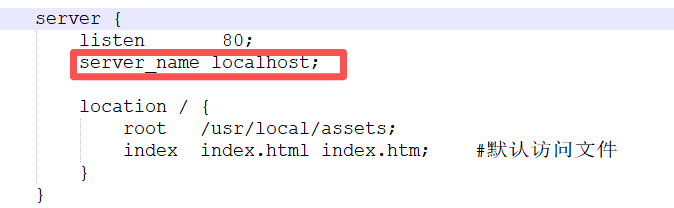
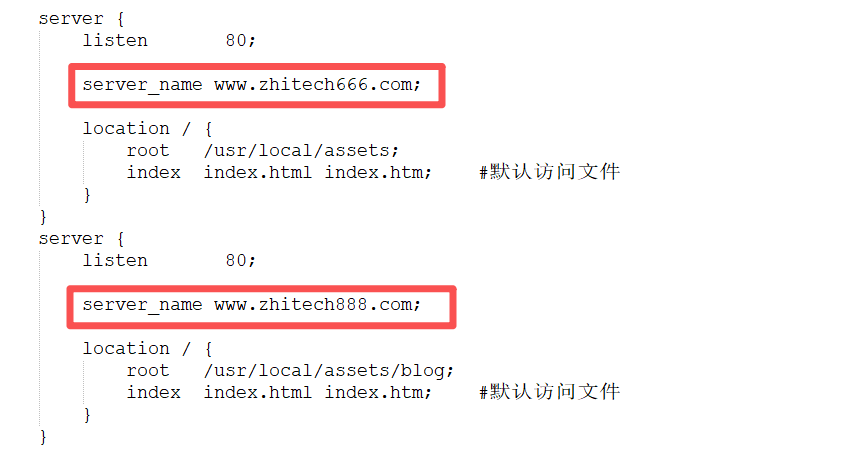
当多个 server 监听的端口号一样时,nginx 会根据设置的 server_name 来获取不同的服务器资源,比如:
4. Location路径映射
location 是 Nginx 最强大的功能之一,它可以根据请求的 URL 路径去处理用户的各种请求。
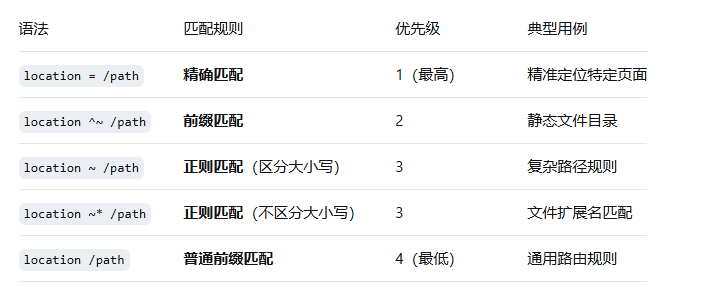
接下来讲一下 location 的匹配优先级:

场景一:精确匹配
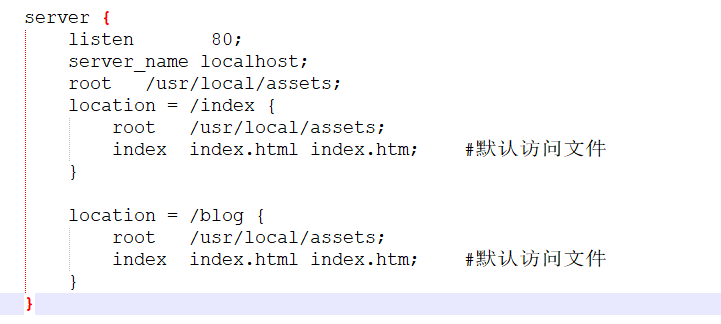
精确匹配就是请求路径要完全一致才能获取相应的服务器资源

注意:
精确匹配要求请求路径和location设置的路径完全一致才能匹配
精确匹配的根路径 root 默认是 /usr/share/nginx/html,你也可以自定义。比如 root 设置的路径是 /usr/local/assets,请求 http://192.168.133.128/blog,实际上获取的是 /usr/local/assets/blog 下面的 index.html。
精确匹配 location 里面设置的 root 无效,只跟外层 server 里面的 root 有关。所以你也可以这样设置:
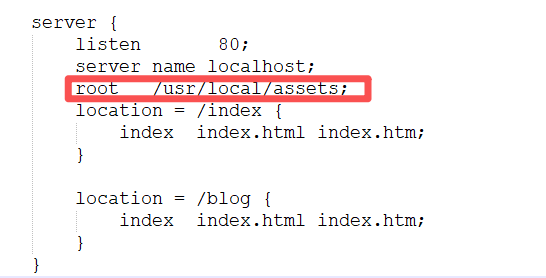
- 如果遇到问题,可以检查 /var/log/nginx/error.log 获取详细错误信息
场景二:前缀匹配
前缀匹配就是匹配请求 URI 中以指定路径开头的所有请求,只要前缀一样就能获取到服务器资源。
案例:获取服务器静态资源
要求:所有以 /static/ 开头的请求(如 /static/img/logo.png、/static/js/index.js),直接获取服务器本地静态文件,同时配置缓存优化访问速度。
 server {
  listen       80;
  server_name localhost;

  location ^~ /assets/ {
   # 本地静态文件根目录(实际文件路径 = root + URI)
     root /usr/local;  # 访问 /assets/img/logo.png 时,实际读取 /usr/local/assets/img/logo.png
     expires 7d;      # 缓存7天,减轻服务器压力
     add_header Cache-Control "public, max-age=604800";
     autoindex off;   # 禁止列出目录文件
  }
}
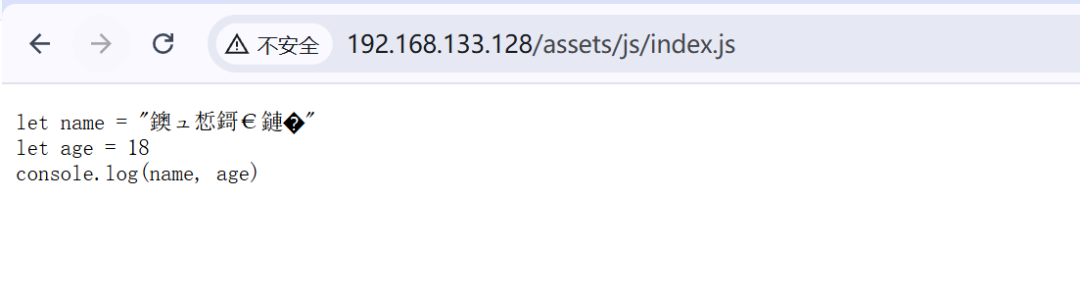
这时候你想了,如果我请求的路径是http://192.168.133.128/static/img/zhifou.jpg,能不能也返回 /usr/local/assets/ 下面的资源?
这个时候就可以用到 alias。alias 翻译过来是别名的意思,它和 root 不一样的地方在于 root 是完全按照路径拼接,而 alias 是只要前缀匹配到,就替换前缀。
server {
  listen       80;
  server_name localhost;
  location ^~ /static/ {
        alias /usr/local/assets/;
        expires 7d;
        add_header Cache-Control "public, max-age=604800";
        autoindex off;
  }
}
注:上面的例子中请求路径匹配到了 static,那么就将 /usr/local/assets/ 替换 static。如果用 alias 结尾必须加 /。
场景三:正则匹配
正则匹配就是请求路径满足正则表达式
server {
    listen 80;
    server_name localhost;

    # 正则匹配(大小写敏感):禁止访问隐藏文件(以 "." 开头)
    location ~ /\. {
        deny all;  # 返回 403 Forbidden
        log_not_found off;  # 不记录 404 日志
    }

    # 正则匹配(大小写不敏感):.html 文件不缓存
    location ~* \.html$ {
        root /var/www/html;
        expires -1;  # 禁止缓存
        add_header Cache-Control "no-store, no-cache";
    }

    # 正则匹配:视频文件缓存 30 天
    location ~* \.(mp4|m3u8|ts)$ {
        root /data/videos;
        expires 30d;
        add_header Cache-Control "public";
        # 视频断点续传支持
        add_header Accept-Ranges bytes;
    }
}
场景四:普通前缀匹配
请求路径的开头部分匹配设置的前缀,多个前缀匹配时,路径最长的 location 生效
比如请求 /static/xxx 会映射到 /usr/local/assets/xxx
location /static {
    # 静态文件根目录(请求 /static/xxx 会映射到 /usr/local/assets/xxx)
    alias /usr/local/assets;
    # 缓存 30 天
    expires 30d;
阅读原文:https://mp.weixin.qq.com/s/yop_LTq3Sxoa5G_A6Cg33Q
该文章在 2025/12/5 18:04:43 编辑过






 400 186 1886